Showing posts with label Tips and tricks. Show all posts

Mobiola Web Camera v3.0.15 Symbian S60v3 & TeaShark v312.


Access Free Airtel GPRS using TeaShark Browser ,This trick cannot be termed illegal as you are not cr@cking any software or modifying any configuration.
More details inside the file........


Download Uploading.com (Only these country please :US, DE, ES, UK, FR, RU, UA IT, CA, NL, AT, CZ)
Click Here

Download Depositfiles (Only these country please :US, RU)
Click Here

Download Easyshare (Other Countries....)
Click Here

Airtel Hack: Unlimited Mobile Office


Just follow the Trick.

Now a days Airtel gives New option to the Subscriber to access Mobile Office daily @25.00/perday. But this is too Costly. Only 24 hours and the cost is 25.00. Oh GOD!!

But I got a Trick thats helps me to Activate my Mobile Office whole 30 days only for 25.00/. Its really goood.

First Trick


1. Your account balance should be above 25.00 for the first time. 2. Acitave your mobile office by dailing *444*1#. You will Activate your Mobile Office in the Morning.
3. You will get an Activation msg. Your account should deducted by 25.00/
4. After that your can enjoy mobile office for 24 hours.
5. But for unlimited access you will do this :: Just switch off your mobile from 7.00 am to 10.00am. and your account balance should be below 25.00 /
6. Just try it enjoy the whole world only by 25.00.

Second Trick


1.Activate Mobile Office on your Airtel Mobile
2.Keep your balance low as it should be close to zero
3.Connect your mobile to PC
4.Surf for free as long as you want

Speed will be a bit slow.

I am Sure you should be Benifited. JUST TRY IT!!!!!!!!!

Airtel Eeclusive Free GPRS : Proxifier Trick

Step By Step Procedure Of Airtel Free GPRS Proxifier Trick

Step 1:-

Insalling nokia pc suite on ur pc/laptop.


Don't have pc suite.
Install from the following link


Step 2 :-

Connect phone with your usb cable. and then this will show in your PC/laptop thru PC suite.


Step 3 :-

Now open connect to internet shown in PC suite menu.
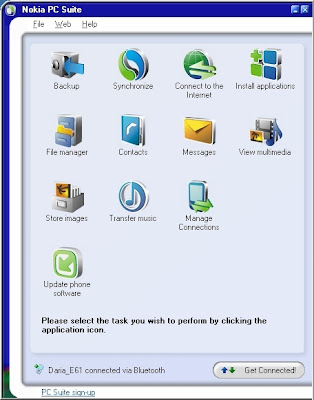


Step 4 :-

In Connect to The Internet Click on settings then
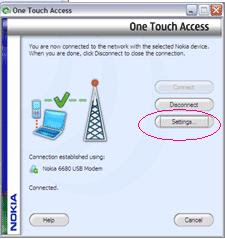


Then click on manually access point then write there airtelfun.com only then next next and finish settings.
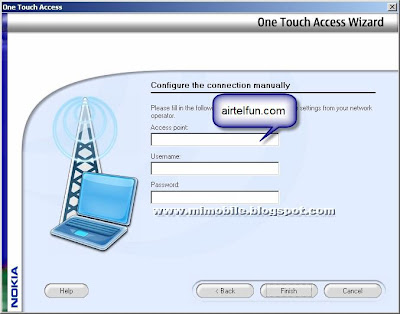


Step 5 :-

Connect to the Internet. It will connect easily.

Then here nokia pc suite configuration is completed.

Step 6:-

Now configure proxifier.

download proxifier From the link easily

Download link:

Ist link



2nd link

Rapidshare
Code:. www.desi-pirates.co.cc


Now extract and run setup easily.

Patch the given extra proxifier.exe to your destination folder where you have install proxifier and overwrite it.

Now you cracked to full version. :)

Step 7 :-

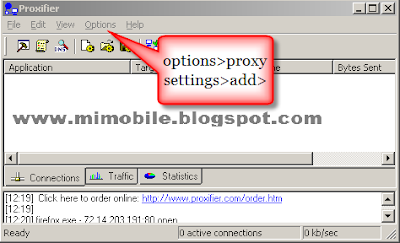
Open Proxifier and go to


options>proxy settings>add> ip 100.1.200.99 & port 8080

Protocol - HTTPS

Username and Password-Blank

Then click Ok.
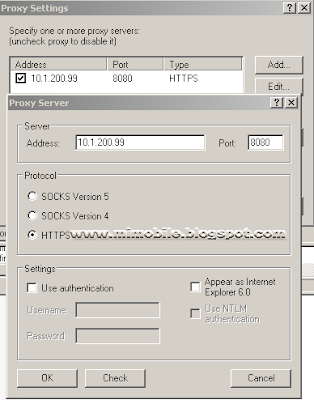


Step 8 :-

Again go to Options>Name Resolutions..

Unchecked choose the mode automatically

and check Remotely

then click OK.
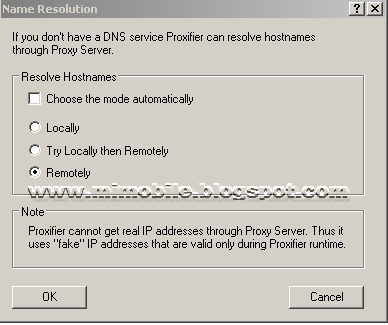


Now you are done.

Connect to the internet thru PC suite and run proxifier.

Now first open Opera as it is the better browser that opens wap and web and set it to connect directly to the Internet(e.g don't use proxy settings as by default your browser is set to connect directly)

Now close your browser and open again and now connect to the Internet using pc suite

And immediately after connecting open the browser and open fast site (e.g just type something in google search bar and hit enter)

All this time keep an eye on the minimised proxifier...If you see opera application connecting through it then it is working...Now wait a bit...If you see incoming data(e.g blue color in graph..green is for outgoing) THEN BINGO!!!!


If after a whole no incoming data is coming then just exit proxifier...disconnect and close the browser and repeat the process.

Note:Don't just disconnect the connection and connect again without exiting proxifier OR your browser ..OR don't keep your browser open and restart proxifier
As proxifier OR Say browser recognises each other only if proxifier opened first

As proxifier uses a fake IP each time it restarted.So it is essential to restart proxifier to restart connection!!!

Also you can chat with your messenger without any confrigiration just like a broadbrand.

Airtel Hack for Free Internet


You need a PC or a Laptop and the required connectivity tools.

Serial/USB cable OR Infrared Device OR Bluetooth dongle

1) Activate Airtel Live! ( It’s FREE so no probs)

2) Create TWO Airtel gprs data accounts (yep TWO) and select the
FIRST as the active profile.

3) Connect your mobile to the PC (or Laptop) and install the driver for
your mobile’s modem.

4) Create a new dial-up connection using the NEW CONNECTION
WIZARD as follows

Connecting Device : Your mobile’s modem
ISP Name : Airtel (or anything you like)
Phone Number : *99***2# / Try 99***1
Username and Password : blank

5) Configure your browser and download manager to use the proxy
100.1.200.99 and port 8080.( My advice is to use Opera since you
can browse both wap and regular websites)

6) Connect to the dial-up account. You will be connected at 115.2
kbps (but remember, that is a bad joke).

7) Pick up your mobile and try to access any site. You will get Access
Denied(except for Airtel Live!). IT DOES NOT MATTER.
Keep the mobile down.

8 ) On the PC ( or Laptop) open your browser, enter any address ,
press ENTER and WAIT

9) After a few seconds the page will start to load and you have the
WHOLE internet at your disposal.


Second Method


Under DATA COMM
~~~~~~~~~~~~

APN : airtelfun.com

USERNAME : blank

PASSWORD : blank

PASS REQ : OFF

ALLOW CALLS : AUTOMATIC

IPADDRESS :

DNSADDRESS :

DATA COMP : OFF

HEADER COMP : OFF


Under INTERNET PROFILES
~~~~~~~~~~~~~~~~

INTERNET MODE : HTTP or WAP (both worked for me)

USE PROXY : YES

IP ADDRESS : 100.1.200.99

PORT : 8080

USERNAME :

PASSWORD :

No Risk Here, Try it and Enjoy


Third Method


First go to settings menu then to connectivity tab now choose the option Data comm. then "DATA ACCOUNTS" go to new account now the settings are as follows

ACCOUNT TYPE:GPRS
NEW ACCOUNT NAME:A1
APN:airtelfun.com
usr name: (blank)
password: (blank)

Save it
NOW!

Just go to Internet Setting in connectivity here choose Intrnet profile--go to new profile setting are as below
NAME:A1
CONNECT USING:A1(which was created in data comm.)
save it
now u would be able to see it now select it and take "more" option then select setting here in use proxy option it will be selected no if it is no then change it into yes
now go to proxy address and give the address as
100.1.200.99 and then the port number as 8080
User name:
password:
Now save all the settings you made . come back to connectivity choose streaming settings now in connect using option choose a1 that we created leave the use proxy option as no itself
THESE ARE THE SETTINGS
And now access Airtellive! from your activated SE phone goto VIDEO GALLERY OR VIDEO UNLIMITED(varies according to states) choose live streaming then choose CNBC OR AAJTAK WHILE CONNECTING TO MEDIA SERVER cancel AFTER 9 or 10 sec then type any web adress if it shows access denied then once again select CNBC and wait for a few more sec than before if its fully connected also no prob its free then cancel it or if your connected then stop it and the internet is ready to take off.GOOD LUCK SE AIRTEL USERS

Alternet Method


For All Airtel Users

Requirements:
1. Airtel live (available for free)
2. Nokia series60 handset eg 6600,6630,n series,7610,6670 etc
3. Opera wap browser for mobile

Procedure:-

1. Go to your connection settings and make a new internet profile using the default settings of Airtel live. name that new profile as nothing(for eg masala); change the home page of that profile to nothing you like for eg www.google.com.

2. Go to your Opera browser and set the default connection as AIRTEL LIVE. this is the original settings
you received through Airtel.

3. Go to the services(in n6600) and Web(N6630) and change the default profile for connection as masala (newer one).

**Note: always make sure that your access point is airtelfun.com

Apply:-

1. Open Opera and
you will see that homepage of Airtel Live is opened. Minimize the application.

2. Now open web using the duplicate Profile and
you will see that two GPRS connections will work simultaneously and at the web or the services page it will show "Unable to connect" or any error. well that's the signal of your success.

3. Simply go on the Opera with web on and open any site
you want for free. No Charges No nothing.

you can also use it through your computer..........

Some other option


Just Try this

First open
your msg window and type LIVE and send it to 2567 so that after five minutes you get the setting of Airtel Live or if you have already no need for this procedure.
Now then open that setting and copy all the settings from it and create one access point manually which has all the settings like Airtel Live has.
Now only one change will be there and it would be in access point name which is "airtelmms.com" instead of originally "Airtelgprs.com".
Ok you've done it just active that setting and access free Airtel GPRS on
your phone.

Note:Please make sure that all of the information provided here are collected from other sites.So try at your level best.What I have to do is to provide you all the information at only one place.

AirTel Hack Unlimited Free SMS Trick - Tested and found Working


Here is a great trick for all the Airtel mobile users, who can send unlimited SMS for Free by following this hack.

Follow the simple steps below:

  • Create a new message center :
    Message Center Name: ANY
    Message Center Number (MOST Important): +919810051905
    Now select preferred connection -> Packet Data
  • After creating a new message center, please manually select it from
    MESSAGE CENTER IN USE BOX.
  • Now Go to setting -> phone setting -> connection -> packet data
  • Here change PACKET DATA CONNECTION -> when available
    and Access Point -> Airtel Live! ( Pls. Write as I have written here)
  • All setting has been DONE !!

Now for sending message. You have to write 0(zero) before any contact number. Pls don’t make mistake.

Note: Don’t Write 91….instead of 91 write 0.. For example: if number is 9998681566 then you’ll write 09998681566.

ENJOY !!! [Source]

Unlimited Instant Free SMS India Direct From AIRTEL LIVE Without Any Data Charges


Till now I have given some free SMS service in India and World.You can also send a free Instant SMS from Airtel.It is fast and you can send unlimited free SMS at no cost.

All you need to do is

1. A GPRS ENABLED HANDSET

2. Airtel connection with "AIRTEL LIVE" GPRS ACTIVATED
[Airtel live is a Pay as you go service with no rental and some free accessible sites ]


First of all register yourself with Renewed Indian SOCIAL NETWORKING
website INDYAROCKS.COM and remember create your login name and password Damn easy so that you can type it easily n fast form your mobile. After registering VERIFY your own mobile no [ requisite step to send SMS ] and that's it
Also choose Profile name extremely small as every time you will send free SMS to anyone it will showed up in top of massage.

Now just Use airtel live settings and open this FREE URL [ won't charged in Airtel ]
http://wap.google.com/gwt/n?u=www.indyarocks.com/mobile/p_rgsms.php
or
http://www.google.co.in/gwt/n?u=www.indyarocks.com/mobile/p_rgsms.php

Login with your Username and password [ what you chose during sign up from PC ]
and now after login you will get this page:


Enter recipient mobile no. [ ANY CDMA or GSM no. ] and in type your text :)
Remember You can only send 90 charcters in 1 msg . I think its Good and far beter than 160by2 .

NOTE: when you click on SUBMIT then next page you will get is
the same page as before i.e. same no. and same text but your sms
has already been sent :) so From now on Enjoy absolutely free texts
LOCAL or national, GSM or CDMA , MOREOVER HOME AREA or in ROAMING
Purely 100 % free of cost... :)


TeaShark - Free Unlimited Internet from Mobile with Airtel Live

Once I had blogged about some hacks to use with Airtel Live for getting free and unlimited Internet . Most of them wont work now as Airtel fixed the loop holes in their service. What now new is, TeaShark - a Java Application just like Opera Mini , which can be used with Airtel Live connection to get unlimited , free and full access to Internet.

TeaShark gives you full web browsing on your mobile phone with superb usability and performance. It renders web pages the same way as desktop browsers. No more ‘mobile web’, your favourite sites are the same on your phone and the desktop.

TeaShark is free to download and use. Its in Java ( .jar) and so will work in a wide range of handsets. And above all, its not illegal as we are not tweaking or hacking any settings in software or handset settings. It worked perfectly for me . On first run , I felt that TeaShark took a bit time to start , in all three cases. After that it is just perfect! I tried with sets with a Airtel Live conenction which is free , but limited to Airtel Portal or related sites. But with TeaShark, I was able to check my Mails , Orkut and Google Reader. So its compatable with Web 2.0 , though not a perfect rendering as in PC.


The key features are :

  • Fast , Smaller and Better , with just 120kb.
  • Tabbed browsing and Page Thumbnails.
  • Remembers previous Browsing Sessions.
  • Bookmarks with Color Tags.
  • Click , Search and Call.
  • Auto complete in Editing.
The whole thing seems a fortunate coincidence
for mobile users and unfortunate one for network
operators. This trick cannot be termed illegal as
you are not cracking any software or modifying
any configuration. For the same reason, I think
this will take longer to get rectified.
Please keep in mind that AirTel or any mobile
operator can calculate all unbilled/free usage
anytime in future thus may charge you all of a sudden.So please use it at your own risk!


So , how to get in action?

Just download the TeaShark into your mobile.
[ Wap version wap.teashark.com ] or from Nokia Mosh

Install in your mobile and enjoy!


Here are some mobile sites…

Find Mobile Number from BSNL Directory And Address Tricks

Do you want to find a person address from his mobile number or landline?does he own a BSNL mobile or landline number?then we shall easily find his address,street,door no and all from the online BSNL mobile and landline directry.
For eg. if you want to find the address of your friend from Madhya Pradesh or Maharashtra,then visit http://www.bsnl.co.in/onlinedirectory.htm
and select the area,for Mumbai,Chennai,Kolkata there are individual directries.In the option "Search by" , select Telephone number. select the station to which the phone no. belongs and finally write the phone number in the "Search key field" . In this way the address of that particular number will be traced.

For selecting any other state of India, log on to http://www.bsnl.co.in/index.html . In the Right hand side you see the "BSNL units" option (above Username field), select your state from the menu and then proceed further to find the address of any person knowing their mobile number or landline number.

How To Send Email To Any Cell Phone for Free

Want to send a short email to a friend and get it delivered to his/her cell phone as SMS? If you know your friends’ phone numbers and the carrier they are on then you can easily send emails to their cell phones directly from your email program.


Here is how it works:

Most of mobile carriers offer free Email To SMS gateways which can be used to forward simple text emails to a mobile phones. And the good news, majority of those gateways are free and available to the general public.

You just need to know the number and the carrier of the recipient to start emailing them to mobile phone. Below we put together a table listing free email to SMS gateways for different carriers. You can use as quick reference both for US and international mobile numbers.


*note: replace the "your phone number" with xxxxxxxxx.


United States


ProviderE-mail to SMS address format
3 River Wirelessxxxxxxxxx@sms.3rivers.net
Advantage Communicationsxxxxxxxxx@advantagepaging.com
AirVoicexxxxxxxxx@mmode.com
Airtouch Pagersxxxxxxxxx@airtouch.net
Airtouch Pagersxxxxxxxxx@airtouchpaging.com
Airtouch Pagersxxxxxxxxx@alphapage.airtouch.com
Airtouch Pagersxxxxxxxxx@myairmail.com
AllTelxxxxxxxxx@message.alltel.com
Alltel PCSxxxxxxxxx@message.alltel.com
Alltelxxxxxxxxx@alltelmessage.com
Ameritech Pagingxxxxxxxxx@pageapi.com
Arch Pagers (PageNet)xxxxxxxxx@archwireless.net
Arch Pagers (PageNet)xxxxxxxxx@epage.arch.com
Bell South (Blackberry)xxxxxxxxx@bellsouthtips.com
Bell South Mobilityxxxxxxxxx@blsdcs.net
Bell Southxxxxxxxxx@blsdcs.net
Bell Southxxxxxxxxx@sms.bellsouth.com
Bell Southxxxxxxxxx@wireless.bellsouth.com
Bluegrass Cellularxxxxxxxxx@sms.bluecell.com
Boost Mobilexxxxxxxxx@myboostmobile.com
Boostxxxxxxxxx@myboostmobile.com
CallPlusxxxxxxxxx@mmode.com
Carolina Mobile Communicationsxxxxxxxxx@cmcpaging.com
Cellular One East Coastxxxxxxxxx@phone.cellone.net
Cellular One PCSxxxxxxxxx@paging.cellone-sf.com
Cellular One South Westxxxxxxxxx@swmsg.com
Cellular One Westxxxxxxxxx@mycellone.com
Cellular Onexxxxxxxxx@message.cellone-sf.com
Cellular Onexxxxxxxxx@mobile.celloneusa.com
Cellular Onexxxxxxxxx@sbcemail.com
Cellular Southxxxxxxxxx@csouth1.com
Central Vermont Communicationsxxxxxxxxx@cvcpaging.com
CenturyTelxxxxxxxxx@messaging.centurytel.net
Cingular (GSM)xxxxxxxxx@cingularme.com
Cingular (TDMA)xxxxxxxxx@mmode.com
Cingular Wirelessxxxxxxxxx@mobile.mycingular.net
Cingularxxxxxxxxx@cingularme.com
Communication Specialistsxxxxxxx@pageme.comspeco.net
Cook Pagingxxxxxxxxx@cookmail.com
Corr Wireless Communicationsxxxxxxxxx@corrwireless.net
Dobson Communications Corporationxxxxxxxxx@mobile.dobson.net
Dobson-Alex Wireless / Dobson-Cellular Onexxxxxxxxx@mobile.cellularone.com
Edge Wirelessxxxxxxxxx@sms.edgewireless.com
GCS Pagingxxxxxxxxx@webpager.us
GTExxxxxxxxx@gte.pagegate.net
GTExxxxxxxxx@messagealert.com
Galaxy Corporationxxxxxxxxx@sendabeep.net
GrayLink / Porta-Phonexxxxxxxxx@epage.porta-phone.com
Houston Cellularxxxxxxxxx@text.houstoncellular.net
Inland Cellular Telephonexxxxxxxxx@inlandlink.com
JSM Tele-Pagexxxxxxxxx@jsmtel.com
Lauttamus Communicationxxxxxxxxx@e-page.net
MCI Phonexxxxxxxxx@mci.com
MCIxxxxxxxxx@pagemci.com
Metro PCSxxxxxxxxx@metropcs.sms.us
Metro PCSxxxxxxxxx@mymetropcs.com
MetroPCSxxxxxxxxx@mymetropcs.com
Metrocall 2-wayxxxxxxxxx@my2way.com
Metrocallxxxxxxxxx@page.metrocall.com
Midwest Wirelessxxxxxxxxx@clearlydigital.com
Mobilecom PAxxxxxxxxx@page.mobilcom.net
Mobilfonexxxxxxxxx@page.mobilfone.com
Morris Wirelessxxxxxxxxx@beepone.net
NPI Wirelessxxxxxxxxx@npiwireless.com
Nextelxxxxxxxxx@messaging.nextel.com
Nextelxxxxxxxxx@page.nextel.com
Ntelosxxxxxxxxx@pcs.ntelos.com
Omnipointxxxxxxxxx@omnipoint.com
Omnipointxxxxxxxxx@omnipointpcs.com
OnlineBeepxxxxxxxxx@onlinebeep.net
PCS Onexxxxxxxxx@pcsone.net
Pacific Bellxxxxxxxxx@pacbellpcs.net
PageMartxxxxxxxxx@pagemart.net
PageOne NorthWestxxxxxxxxx@page1nw.com
Pioneer / Enid Cellularxxxxxxxxx@msg.pioneerenidcellular.com
Price Communicationsxxxxxxxxx@mobilecell1se.com
ProPagexxxxxxxxx@page.propage.net
Public Service Cellularxxxxxxxxx@sms.pscel.com
Qualcommname@pager.qualcomm.com
Qwestxxxxxxxxx@qwestmp.com
RAM Pagexxxxxxxxx@ram-page.com
ST Pagingpin@page.stpaging.com
Safaricomxxxxxxxxx@safaricomsms.com
Satelindo GSMxxxxxxxxx@satelindogsm.com
Satellinkxxxxxxxxx.pageme@satellink.net
Simple Freedomxxxxxxxxx@text.simplefreedom.net
Skytel Pagersxxxxxxxxx@email.skytel.com
Skytel Pagersxxxxxxxxx@skytel.com
Smart Telecomxxxxxxxxx@mysmart.mymobile.ph
Southern LINCxxxxxxxxx@page.southernlinc.com
Southwestern Bellxxxxxxxxx@email.swbw.com
Sprint PCSxxxxxxxxx@messaging.sprintpcs.com
Sprintxxxxxxxxx@sprintpaging.com
SunComxxxxxxxxx@tms.suncom.com
Surewest Communicationsxxxxxxxxx@mobile.surewest.com
T-Mobilexxxxxxxxx@tmomail.net
TIMxxxxxxxxx@timnet.com
TSR Wirelessxxxxxxxxx@alphame.com
TSR Wirelessxxxxxxxxx@beep.com
Teletouchxxxxxxxxx@pageme.teletouch.com
Telusxxxxxxxxx@msg.telus.com
The Indiana Paging Coxxxx@pager.tdspager.com
Tritonxxxxxxxxx@tms.suncom.com
US Cellularxxxxxxxxx@email.uscc.net
USA Mobilityxxxxxxxxx@mobilecomm.net
Unicelxxxxxxxxx@utext.com
Verizon PCSxxxxxxxxx@myvzw.com
Verizon Pagersxxxxxxxxx@myairmail.com
Verizonxxxxxxxxx@vtext.com
Virgin Mobilexxxxxxxxx@vmobl.com
Virgin Mobilexxxxxxxxx@vxtras.com
WebLink Wirelessxxxxxxxxx@pagemart.net
West Central Wirelessxxxxxxxxx@sms.wcc.net
Western Wirelessxxxxxxxxx@cellularonewest.com
Wyndtellxxxxxxxxx@wyndtell.com


Austria


ProviderE-mail to SMS address format
MaxMobilxxxxxxxxxx@max.mail.at
One Connectxxxxxxxxx@onemail.at
T-Mobilexxxxxxxxx@sms.t-mobile.at


Australia


ProviderE-mail to SMS address format
Blue Sky Frogxxxxxxxxx@blueskyfrog.com
Optus Mobilexxxxxxxxx@optusmobile.com.au


Belgium


ProviderE-mail to SMS address format
Mobistarxxxxxxxxx@mobistar.be


Bermuda


ProviderE-mail to SMS address format
Mobilityxxxxxxxxx@ml.bm


Brazil


ProviderE-mail to SMS address format
Nextelxxxxxxxxx@nextel.com.br


Canada


ProviderE-mail to SMS address format
Bell Mobilityxxxxxxxxx@txt.bell.ca
Bell Mobilityxxxxxxxxx@txt.bellmobility.ca
Fidoxxxxxxxxx@fido.ca
Microcellxxxxxxxxx@fido.ca
Manitoba Telecom Systemsxxxxxxxxx@text.mtsmobility.com
NBTelxxxxxxxxx@wirefree.informe.ca
PageMartxxxxxxxxx@pmcl.net
PageNetxxxxxxxxx@pagegate.pagenet.ca
Rogersxxxxxxxxx@pcs.rogers.com
Telusxxxxxxxxx@msg.telus.com


Chile


ProviderE-mail to SMS address format
Bell Southxxxxxxxxx@bellsouth.cl


Czech Republic


ProviderE-mail to SMS address format
Eurotel+ccaaxxxxxxx@sms.eurotel.cz
Oskarxxxxxxxxx@mujoskar.cz


Denmark


ProviderE-mail to SMS address format
Sonofonxxxxxxxx@note.sonofon.dk
Tele Danmark Mobilxxxxxxxx@sms.tdk.dk
Telia Denmarkxxxxxxxxx@gsm1800.telia.dk


Estonia


ProviderE-mail to SMS address format
EMTxxxxxxxxx@sms.emt.ee


France


ProviderE-mail to SMS address format
SFRxxxxxxxxx@sfr.fr


Germany


ProviderE-mail to SMS address format
T-Mobile+49xxxxxxx@t-d1-sms.de
Mannesmann Mobilefunkxxxxxxx@d2-message.de
E-Plus0177xxxxxxx.sms@eplus.de


Hungary


ProviderE-mail to SMS address format
PGSM3620xxxxxxx@sms.pgsm.hu


India


ProviderE-mail to SMS address format
BPL mobilexxxxxxxxx@bplmobile.com
Chennai RPG Cellularxxxxxxxxx@rpgmail.net
Chennai Skycell / Airtelxxxxxxxxx@airtelchennai.com
Delhi Aritelxxxxxxxxx@airtelmail.com
Delhi Hutchxxxxxxxxx@delhi.hutch.co.in
Idea Cellularxxxxxxxxx@ideacellular.net
Orangexxxxxxxxx@orangemail.co.in


Ireland


ProviderE-mail to SMS address format
Meteorxxxxxxxxx@sms.mymeteor.ie


Italy


ProviderE-mail to SMS address format
Telecom Italia Mobile33xxxxxxxx@posta.tim.it
Vodafone Omnitel34xxxxxxxx@vizzavi.it
Vodafonexxxxxxxxx@sms.vodafone.it


Japan


ProviderE-mail to SMS address format
Vodafone Japanxxxxxxxxx@c.vodafone.ne.jp
Vodafone Japanxxxxxxxxx@h.vodafone.ne.jp
Vodafone Japanxxxxxxxxx@t.vodafone.ne.jp


Latvia


ProviderE-mail to SMS address format
Kyivstarxxxxxxxxx@smsmail.lmt.lv
LMT9xxxxxx@smsmail.lmt.lv
Tele2xxxxxxxxx@sms.tele2.lv


Lebanon


ProviderE-mail to SMS address format
Cellis / LibanCell9613xxxxxx@ens.jinny.com.lb


Luxembourg


ProviderE-mail to SMS address format
P&T Luxembourgxxxxxxxxx@sms.luxgsm.lu


Malaysia


ProviderE-mail to SMS address format
Celcom019xxxxxxx@sms.celcom.com.my


The Netherlands


ProviderE-mail to SMS address format
Dutchtone / Orange-NLxxxxxxxxx@sms.orange.nl


Norway


ProviderE-mail to SMS address format
Netcomxxxxxxxxx@sms.netcom.no
Telenorxxxxxxxxx@mobilpost.no


Panama


ProviderE-mail to SMS address format
Cable and Wirelessxxxxxxxxx@cwmovil.com


Poland


ProviderE-mail to SMS address format
Plus GSM+4860xxxxxxx@text.plusgsm.pl


Portugal


ProviderE-mail to SMS address format
Telcel91xxxxxxx@sms.telecel.pt
Optimus93xxxxxxx@sms.optimus.pt
TMN96xxxxxxx@mail.tmn.pt


Russia


ProviderE-mail to SMS address format
BeeLine GSMxxxxxxxxx@sms.beemail.ru
MTS7xxxxxxxxxx@sms.mts.ru
Personal Communicationsms@pcom.ru (number in subject line)
Primtelxxxxxxxxx@sms.primtel.ru
SCS-900xxxxxxxxx@scs-900.ru
Uraltelxxxxxxxxx@sms.uraltel.ru
Vessotelxxxxxxxxx@pager.irkutsk.ru


Serbia and Montenegro (Yugoslavia)


ProviderE-mail to SMS address format
Mobtel Srbijaxxxxxxxxx@mobtel.co.yu


Singapore


ProviderE-mail to SMS address format
MiWorldxxxxxxxxx@m1.com.sg
Mobileonexxxxxxxxx@m1.com.sg


Slovenia


ProviderE-mail to SMS address format
Mobitelxxxxxx@linux.mobitel.si
Si Mobilxxxxxx@simobil.net


Spain


ProviderE-mail to SMS address format
Movistarxxxxxxxxx@correo.movistar.net
Vodafonexxxxxxxxx@vodafone.es


Sweden


ProviderE-mail to SMS address format
Comviq GSM467xxxxxxxx@sms.comviq.se
Europolitan4670xxxxxxx@europolitan.se


Switzerland


ProviderE-mail to SMS address format
Sunrise Mobilexxxxxxxxx@freesurf.ch
Sunrise Mobilexxxxxxxxx@mysunrise.ch
Swisscomxxxxxxxxx@bluewin.ch


Tanzania


ProviderE-mail to SMS address format
Mobitelxxxxxxxxx@sms.co.tz


Ukraine


ProviderE-mail to SMS address format
Golden Telecomxxxxxxxxx@sms.goldentele.com
Kyivstarxxxxxxxxxx@2sms.kyivstar.net
UMCxxxxxxxxx@sms.umc.com.ua


United Kingdom


ProviderE-mail to SMS address format
Orange0973xxxxxx@omail.net
Orangexxxxxxxxx@orange.net
O2name@o2.co.uk
O2 (M-mail)xxxxxxxxx@mmail.co.uk
T-Mobile UKxxxxxxxxx@t-mobile.uk.net
Vodafone UKxxxxxxxxx@vodafone.net


Please Note: While this protocol is popular, it was not designed for paging and as such it is not time sensitive, there can be delays in the reciept of the email depending on the routing (this does not have anything to do with the software but the design of the protocol). If your carrier supports SNPP or WCTP we would suggest using those protocols if time is an issue!

If you are aware of any other free sms to email gateways please add it in comments. Also let us know whether you tried any of the above and your experience with it.